How to Prevent Laptop Screen & Hinge Damage (Bloomington, MN Guide) – 4/3/2026
Expert Tips from Twin Cities PC Repair
Laptop screen and hinge damage is one of the most common (and costly) repairs we see at Twin Cities PC Repair in Bloomington, MN. The good news? Most of these issues are completely preventable with just a few simple habits.
Whether you’re using your laptop for work, school, or everyday browsing, protecting your screen and hinges can extend the life of your device and save you from expensive repairs.
🚫 The #1 Cause of Hinge Damage
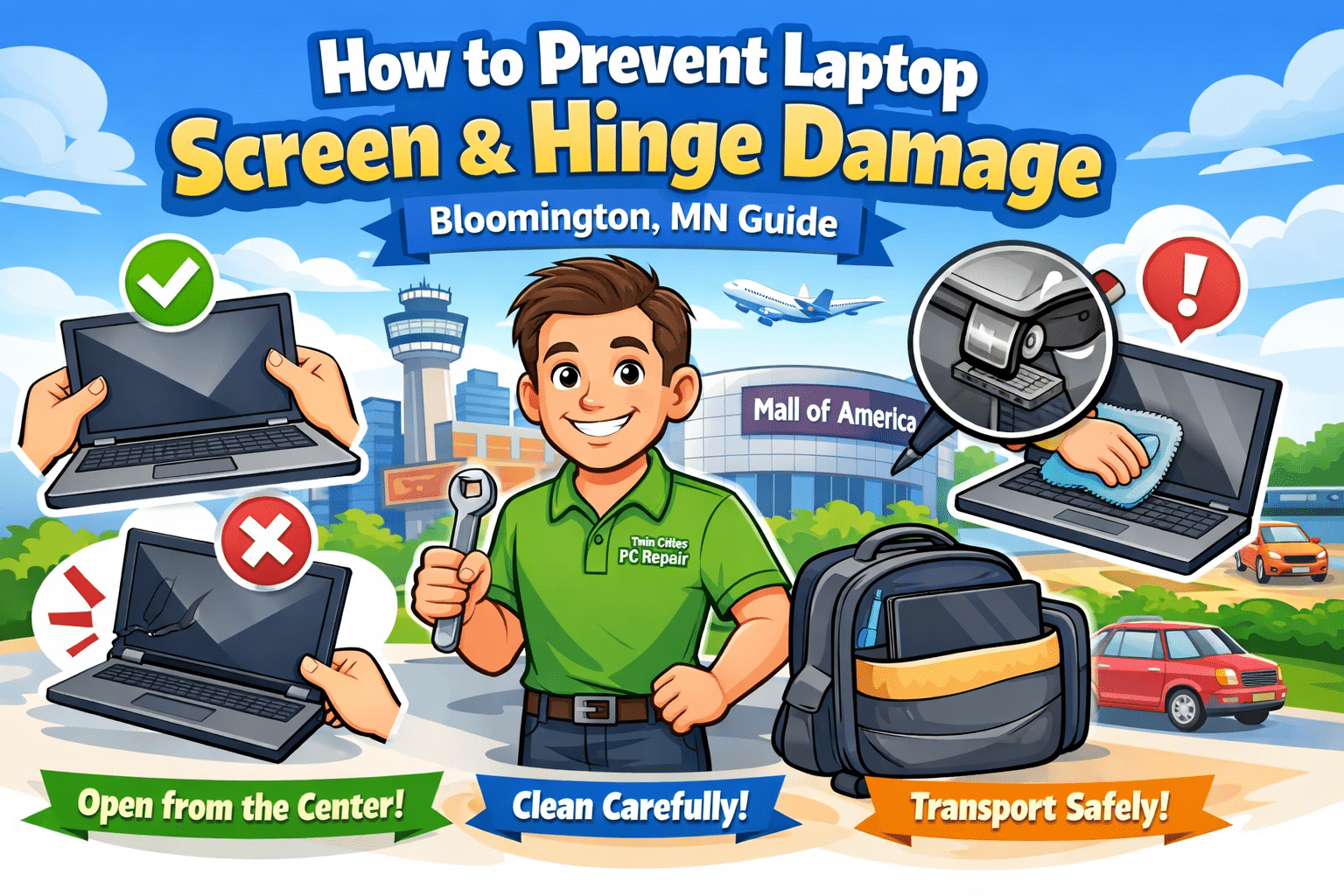
The biggest mistake people make is opening their laptop from one corner of the screen.
When you do this, you’re putting uneven stress on the hinges. Over time, this causes:
Loose or wobbly hinges
Cracking near the hinge mounts
Full hinge failure
Damage to the screen itself
✅ The Correct Way to Open Your Laptop
Always open and close your laptop from the center of the screen edge.
This distributes force evenly across both hinges and significantly reduces wear. It’s a small habit that makes a big difference.
💻 Proper Screen Cleaning Matters
Cleaning your screen incorrectly can lead to scratches, pressure damage, or even internal display issues.
Safe Cleaning Tips:
Use a clean microfiber cloth only
Apply cleaner to the cloth—not directly to the screen
Wipe gently using light pressure
Avoid:
Paper towels or rough materials
Household cleaners like glass spray
Pressing too hard on the display
Taking 30 seconds to clean your screen properly helps preserve both clarity and durability.
🎒 Protect Your Laptop During Transport
A large percentage of screen damage happens when laptops are being carried around.
If you’re commuting around Bloomington, heading to the MSP Airport, or just tossing your laptop in a bag, protection is key.
Best Practices:
Use a padded laptop sleeve or case
Keep heavy objects away from your laptop
Avoid overpacking bags
Never place pressure on the lid
Even a small amount of repeated pressure can weaken hinges and crack screens over time.
⚠️ Watch for Early Warning Signs
Catching issues early can prevent a small problem from turning into a major repair.
Look for:
Tight or uneven hinge movement
Clicking or popping sounds
Screen separating from the frame
Visible stress cracks near hinges
If you notice any of these signs, stop using the device and have it checked out. Continuing to open and close a damaged hinge can destroy the screen completely.
🔧 Skip the DIY Repairs
Laptop hinges are more complex than they look. They’re often mounted into delicate plastic or thin metal brackets.
DIY repairs can easily make things worse by:
Stripping screw mounts
Breaking internal supports
Damaging the display cable or screen
If you’re unsure, it’s always safer (and often cheaper in the long run) to have a professional handle it.
🛠️ Local Laptop Repair in Bloomington, MN
At Twin Cities PC Repair, we help customers across Bloomington and the Twin Cities prevent and repair laptop damage every day.
We offer:
Honest diagnostics
Affordable repair options
Fast turnaround times
📍 Conveniently located near MSP Airport and Mall of America ⚡ Priority rush service available ($185/hr, 1-hour minimum) 💻 Residential Sales & Support
🔑 Final Takeaway
Preventing laptop screen and hinge damage comes down to a few simple habits:
Open your laptop from the center
Handle your device gently
Use proper cleaning methods
Protect it during transport
Address issues early
These small changes can dramatically extend the life of your laptop and help you avoid costly repairs.
Windows 11 Updates Are Breaking PCs Again in 2026 – Here’s What You Need to Know (Bloomington, MN) – 4/1/2026
🚨 A Growing Problem in 2026: Windows 11 Update Failures
If it feels like Windows 11 updates are causing more headaches lately—you’re not imagining it.
In fact, recent 2026 updates have caused widespread installation failures, login issues, and system instability, forcing Microsoft to pause releases and issue emergency fixes. (Tom’s Hardware)
One of the latest updates even failed to install entirely for many users due to missing or corrupted files, leaving systems stuck mid-update. (Tom’s Hardware)
At the same time, another update caused users to lose access to apps like OneDrive, Teams, and Microsoft 365, despite having an internet connection. (Windows Central)
👉 Bottom line: Windows updates are currently one of the #1 reasons customers are bringing their computers in for repair.
💻 Why This Is Happening
Microsoft has openly admitted that Windows 11 has “gone off track” and is now undergoing a major overhaul in 2026. (Windows Latest)
Here’s what’s contributing to the problem:
Frequent feature changes (especially AI tools like Copilot)
Rushed update rollouts
Compatibility issues with drivers and older hardware
Overly complex system updates
Microsoft is now trying to fix this by:
Reducing AI “bloat” like excessive Copilot integration (Redmondmag)
Improving performance and reliability
Giving users more control over updates
But until these improvements fully roll out, real-world issues are still very common.
🔧 Common Windows 11 Issues We’re Seeing in Bloomington, MN
At Twin Cities PC Repair, we’re actively helping customers fix:
❌ Windows updates stuck or failing to install
🔁 Boot loops after updates
🔑 Login/sign-in issues
🐢 Sluggish performance after upgrades
⚠️ Driver conflicts (especially printers & Wi-Fi)
💾 Corrupted system files
These problems can happen on brand new PCs or older systems upgrading to Windows 11.
🛠️ Can You Fix It Yourself?
Sometimes—but not always.
Here are a few quick things you can try:
Restart your PC and retry the update
Run Windows Update Troubleshooter
Check for driver updates
Free up disk space
⚠️ But be careful—DIY fixes can make things worse if:
⚡ Need it fixed fast?
We also offer residentialpriority rush service at $125/hr (2-hour minimum).
💡 Pro Tip: Prevent Future Issues
Here’s what we recommend to customers:
Delay major updates until they’re stable
Keep regular backups (critical!)
Avoid forcing updates manually
Keep drivers and BIOS updated
Have a trusted local repair shop on standby 😉
🧠 Final Thoughts
Windows 11 isn’t broken—but it is going through major growing pains in 2026.
With Microsoft actively rebuilding parts of the OS and scaling back problematic features, things should improve—but right now, update-related issues are one of the biggest repair trends we’re seeing locally.
If your computer is acting up, don’t wait until it gets worse.
We use cookies to ensure that we give you the best experience on our website. If you continue to use this site we will assume that you are happy with it.

Recent Comments